

Choosing An Authentication Method
Users in the Base app are authenticated with passkey account using Sign in with Ethereum (SIWE) or their Farcaster account using Sign in With Farcaster. When deciding between SIWE and SIWF, the core question is whether your app depends on Farcaster’s social context or must work outside Farcaster clients.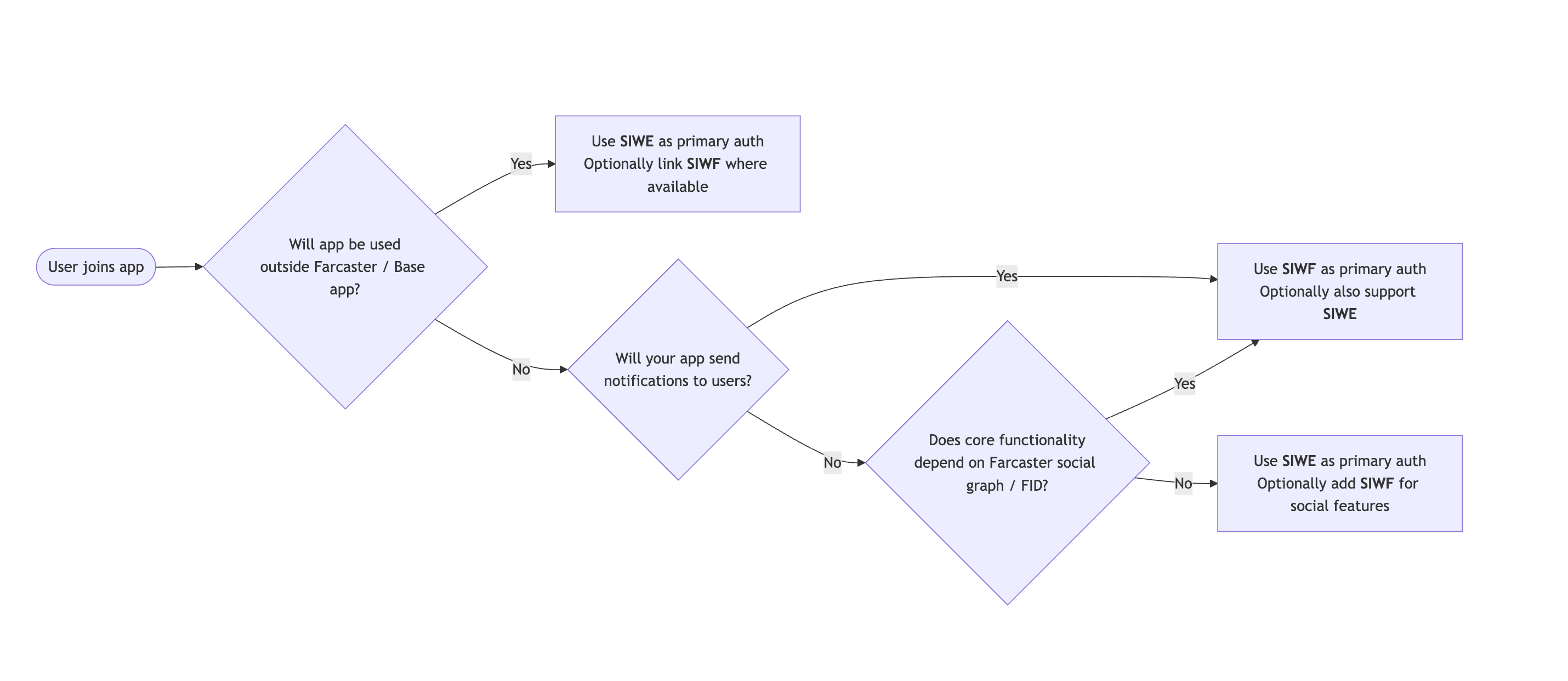
Sending Notifications
If your app plans to send notifications to users, you must use SIWF. Notifications require a Farcaster identity (FID), which is only available through Sign-in With Farcaster. You can still support SIWE if your app also needs a universal wallet-based identity, but SIWF is required for any notification functionality.App location
If your app will be used on the open web, other wallets, or standalone mobile apps, use SIWE as your primary authentication. You can still offer SIWF when the user arrives from a Farcaster client.Utilizing Farcaster Social Graph
If your app does not rely on followers, FIDs, casts, or social graph logic, use SIWE and optionally support SIWF for enhanced social features. If your app does rely on that data, consider if you are willing to require users to have a Farcaster account.Quick Auth
Quick Auth provides instant authentication by leveraging Farcaster’s identity system - no passwords, email verification, or complex OAuth flows required. When Quick Auth is called:- The user authenticates with a signature
- The SDK returns a JWT that your backend verifies to confirm the user’s identity
- The backend returns trusted data that can be used for sensitive actions
This differs from the Context API, which provides instant access to user information without authentication but cannot be trusted for sensitive operations.
Implementation
Step 1: Frontend Authentication
This code authenticates the user with Quick Auth, stores the JWT in memory, and uses it to verify the user’s identity with your backend.App.tsx
Step 2: Backend Verification
Install the Quick Auth client:@farcaster/quick-auth package.
route.tsx